If you want to know how to get more Google reviews, the answer is mostly routine: hand every happy customer a direct review link while the good experience is still fresh. Plenty of happy customers never leave a review simply because nobody asked them, or because finding the review box took too many taps. This guide covers 10 ways to get more reviews, the words to use when you ask, what Google and the FTC ban, and a calculator that shows how many 5-star reviews it takes to move your rating.
We help small businesses with their Google Business Profiles from our office in Raleigh, and our own profile sits at 22 reviews and a 5.0 average as of November 2026. Every rule below links to Google’s own help pages or the FTC’s rule, checked on November 9, 2026.
How to get more Google reviews: 10 ways that work
Send every customer your direct Google review link right after a good experience, make asking part of your routine, and reply to the reviews you get.
Google’s own advice is short: remind customers to leave reviews with a Google link or QR code, reply to reviews, and value all of them, good and bad (Tips to get more reviews). Here’s how that turns into a system that actually brings reviews in:
- Get your review link. One link that opens the review box directly. Steps are in the next section.
- Ask in person, then send the link. A quick “would you mind leaving us a review?” at the end of a job lands better than a cold email weeks later.
- Text the link. A text puts the review box one tap away on the phone already in their hand.
- Put it in your thank-you and follow-up emails. Google suggests thank-you emails and receipts as places to share the link (Create a Google link or QR code).
- Print the QR code. Put it on the counter, the invoice, the back of a business card or the packing slip.
- Add it to your website. A “Review us on Google” button on your contact or thank-you page catches people who already like you.
- Add it to your email signature. Every email you send becomes a small reminder.
- Make it a step in your process. Ask every customer at the same point in every job, so it happens even on busy days.
- Reply to every review. It shows future customers someone is listening, and Google lists replying as one of its tips.
- Follow up once. One friendly reminder a few days later is fine. More than that starts to feel like pressure.
How do I get my Google review link?
Open your Business Profile on a computer, select Read reviews, then Get more reviews. Copy the link or download the QR code from there.
These are Google’s steps from its help page on creating a review link or QR code:
- Sign in to the Google account that manages your business and go to your Business Profile.
- Select Read reviews, then Get more reviews.
- Select Copy to copy your review link.
- For the QR code, right-click it and choose Save image as. Google notes the QR code can only be made in a computer browser, not on a phone.
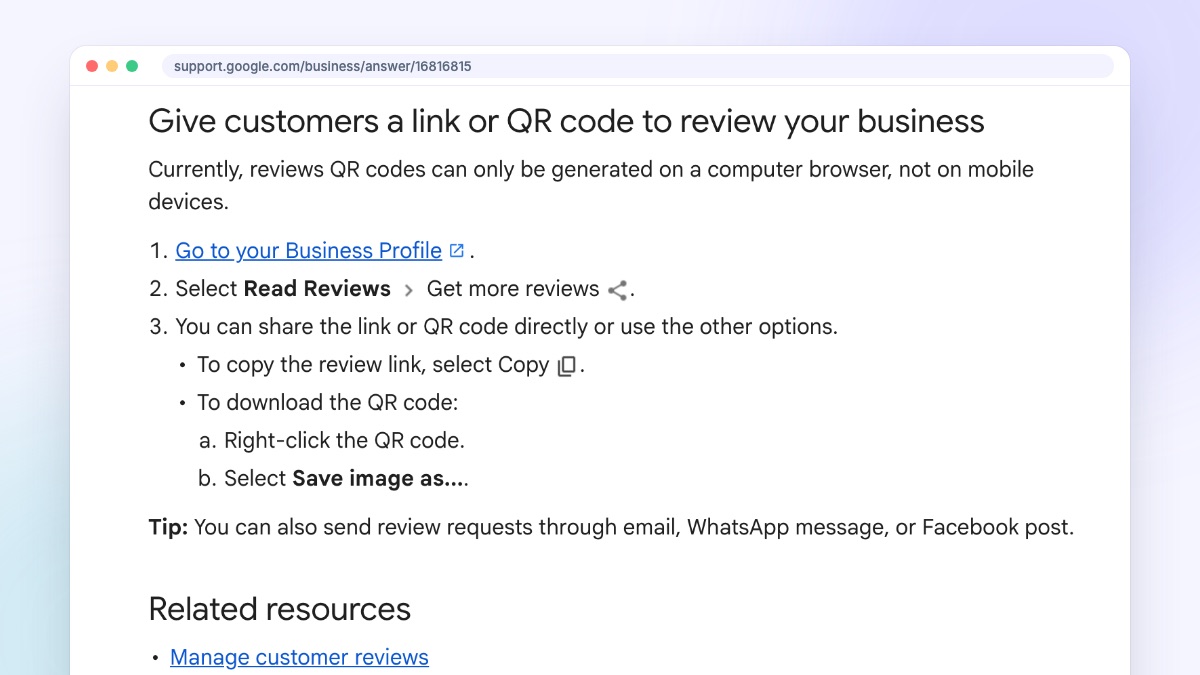
If you don’t see the option, your profile probably isn’t verified yet. You need a verified profile to manage reviews, and our guide to Google Business Profile verification walks through every method. Save the link somewhere your whole team can grab it, like a pinned note or a text shortcut.
When is the best time to ask for a Google review?
Right after the customer says something nice or the job is finished, while the experience is fresh. Same day is best. Weeks later rarely works.
Watch for the moment a customer thanks you, says they love the result, or tells you they’ll recommend you. That’s the moment to ask, because they’ve just said out loud what they’d write in the review, and asking then feels natural instead of salesy.
For service businesses, that’s usually at the end of the visit or when you send the final invoice. For shops, it’s at checkout or when the order arrives. For a project like a new website, ask at launch, when the client is seeing the finished result for the first time.
What should I say when I ask for a review?
Keep it short and personal: thank them, say a review really helps a small business, and include the direct link so it takes one tap.
Here are three versions you can copy. Change the details so they sound like you.
In person: “I’m really glad it turned out the way you wanted. If you have a minute this week, a Google review would help us a lot. Can I text you the link?”
By text: “Hi Sam, thanks again for having us out today. If you have 30 seconds, would you mind leaving us a Google review? It really helps a small business like ours: [your review link]”
By email: “Subject: Thanks from [your business]. Hi Sam, thank you for choosing us. If you were happy with the work, a quick Google review would mean a lot and helps other people find us. Here’s the link, it opens the review box directly: [your review link]. If anything wasn’t right, just reply to this email and I’ll fix it.”
Two things to leave out. Don’t tell them what to write or ask for five stars, and don’t offer anything in return. Both break Google’s rules, which we cover below.
How many 5-star reviews do I need to raise my rating?
It depends on how many reviews you already have. Google’s score is a straight average, so a business with 40 reviews needs far more new ones to move than a business with 5.
Google says the review score “is the average of all ratings published on Google” for that business, and that a new review can take up to 2 weeks to change the score (Understand review scores). Because it’s a plain average, you can work out exactly what it takes. Put your numbers in below.
Your Google rating
Example numbers shown. Change any field and the result updates.
What it takes
24
new 5-star reviews, with no lower ones in between
- Your rating after those reviews4.50
- Total reviews you’d have64
- If they were all 4-star insteadNot possible
At 4 reviews a month, that’s about 6 months of steady asking.
A few worked examples, using the same simple average math:
- 40 reviews at 4.2 stars, aiming for 4.5: you need 24 new 5-star reviews in a row. Any 4-star reviews in the mix can't get you there, since they sit below the target.
- 15 reviews at 3.9, aiming for 4.0: just 2 new 5-star reviews. Small profiles move fast.
- Ten 5-star reviews, then one 1-star: the average drops to about 4.6. Getting back to 4.8 takes 9 more 5-star reviews, and getting back to 4.9 takes 29.
That last example is why the steady routine matters more than any one push. A business with 200 reviews barely notices one bad one. A business with 10 feels it for months. One caveat: the rating on your profile is shown with one decimal place, so the real average behind it can be slightly higher or lower, and your answer can be off by a review or two.
Can I offer a discount or gift for Google reviews?
No. Google bans any incentive for reviews, even for honest ones, and the FTC bans rewards tied to positive reviews. Asking for an honest review is always fine.
Google's policy is strict here. Merchants may not offer incentives, "such as payment, discounts, free goods and/or services," in exchange for posting any review, and they also may not "discourage or prohibit negative reviews, or selectively solicit positive reviews from customers" (Maps user contributed content policy). That second rule rules out "review gating": asking customers if they were happy first and only sending the review link to the ones who said yes.
The same policy says businesses shouldn't pressure people to review while on the premises, ask staff to collect a set number of reviews, or ask for specific content in the review, such as naming an employee. Reviews from people with a conflict of interest, like current or former employees, competitors or family members, aren't allowed either.
Federal law backs this up. The FTC's rule on consumer reviews makes it illegal for a business to give compensation or incentives "conditioned expressly or by implication on" a review expressing a particular sentiment, positive or negative (16 CFR Part 465, Rule on the Use of Consumer Reviews and Testimonials). It also covers fake reviews, reviews written by a company's own managers without a clear disclosure, and using threats to get a review removed.
Getting caught costs more than the reviews were worth. Google says it can stop a profile from getting new reviews for a set time, unpublish its existing reviews, or show a warning to customers that fake reviews were removed (Business Profile restrictions for policy violations).
Should I reply to every Google review?
Yes. Short, personal replies show future customers that a real person is paying attention, and a calm reply to a bad review can matter more than the review itself.
Google's reply tips boil down to this: keep it short, skip the copy-paste "thank you" on every review, don't use replies to push deals, and never share a reviewer's private information (Tips to get more reviews). For a negative review, apologize where it's fair, explain what you can and can't do, and offer to sort it out by phone or email. Google notes that a good reply "may even encourage the customer to update their review."
If a review breaks Google's rules, for example it's spam, a fake from someone who was never a customer, or abusive, you can report it to Google. A review being negative isn't enough on its own.
Do Google reviews help you rank on Google Maps?
Yes. Google says the number of reviews you have feeds into prominence, one of its local ranking factors, and that more reviews and positive ratings can help.
Google ranks local results on relevance, distance and prominence. On prominence, it says the factor is "based on info like how many websites link to your business and how many reviews you have," and that "more reviews and positive ratings can help your business's local ranking" (Tips to improve your local ranking on Google).
We've seen the gap on our own profile. When we checked the Raleigh map results for web design searches in March 2026, we had 21 reviews and the competitors ranking above us had between 50 and 334. Reviews aren't the only factor, but they're one you control. If your business doesn't show on the map at all, that's usually a different problem, and our guide to why your business isn't showing on Google Maps covers the fixes. For the rest of your profile, see our Google Business Profile optimization guide.
Why aren't my Google reviews showing up?
New reviews can take a few days to appear while Google checks them, and Google removes reviews it flags as spam or against policy. Removed reviews don't come back.
According to Google, reviews are checked against its policies before they appear, which "might take a few days." Reviews can also be slow to show after two profiles are merged, and customers on older phones or older versions of the Maps app may have trouble posting (About missing or delayed reviews).
Google's policy also removes reviews that show "unusual volumes or patterns" suggesting someone is trying to manipulate a rating (Maps user contributed content policy). That's one more reason to ask every customer as part of your routine instead of blasting your whole list in one afternoon.
Frequently asked questions
How many Google reviews should a small business have?
There's no magic number. Look at the businesses that show up above you on Google Maps for your main service and aim to match or beat their review count over time. A steady stream of recent reviews also matters, because people notice when the newest review is a year old.
Can customers leave a Google review without a Gmail account?
They need a Google Account, but it doesn't have to be Gmail. Google says customers can set one up with a non-Gmail email address.
Can I remove a bad Google review?
Only Google can remove a review, and only if it breaks Google's policies, such as spam, fake reviews or abusive content. You can report it from your Business Profile. For an honest bad review, the best fix is a calm, helpful reply.
Can my employees or family leave Google reviews for my business?
No. Google treats reviews from current or former employees, family members and others with a conflict of interest as rating manipulation and removes them. Under the FTC rule, managers and officers who review their own business without disclosing that relationship are also breaking the law.
How long does it take for a Google review to show up?
Usually it appears quickly, but Google checks reviews against its policies first, which can take a few days. Google says your overall review score can take up to 2 weeks to update after a new review.
Want help with your Google Business Profile?
Getting reviews is mostly habit. The setup around it, a verified profile, the right categories, a website that turns profile visitors into calls, is where we come in. If you'd like a hand with your Google Business Profile or your website, get in touch or call us at (919) 444-2005. If you're starting from scratch, our guide to small business web design is a good place to begin.