Google Maps can now call your business on a customer’s behalf. On November 16, 2026, Google added appointment finding to Ask Maps, the AI chat inside Google Maps. Someone asks for “a 4 p.m. nail appointment near me,” and Ask Maps checks local businesses online, calls them if it needs to, and shows the open slots. It’s starting in the U.S. with beauty, pet care, auto and home repair. If you run one of those businesses, here’s what Ask Maps does, what Google’s call sounds like, how to control it, and how to make sure your open times show up.
Want your Google listing ready for this?
We help local businesses keep their Google Business Profile accurate and build websites that turn a search into a booked appointment. Tell us what you run and we’ll tell you what to fix first.
What is Ask Maps in Google Maps?
Ask Maps is the AI chat built into Google Maps. You ask a question in plain words, and it answers with places, details and links you can follow up on.
Google launched Ask Maps on March 12, 2026, and said in its launch post that it was rolling out in the U.S. and India on Android and iOS. Google’s help page, Ask questions in Google Maps, describes it as a way to “ask questions and get an AI-powered response,” with follow-up questions and links to the web. On a phone, you open it from the Ask Maps button under the search bar.
In the November 16 announcement, Google said Ask Maps is expanding to 30 countries across Europe, which brings it to more than 200 countries and territories.
What did Google add to Ask Maps on November 16?
Four features: day-by-day trip itineraries, route tips before you leave, appointment finding at local businesses, and a search of your saved lists for places with availability.
Google’s post was written for people planning holiday travel and errands. The four new features:
- Itineraries: a day-by-day plan with numbered stops on the map, which you can share.
- “Know before you go” route tips: parking, charging, weather, delays and tolls when you pull up directions.
- Appointment finding: Ask Maps can “find beauty, pet care, auto and home repair appointments online and call local businesses for you.”
- Saved-list search: ask which places on your lists have room for your group right now.
Itineraries and list search work everywhere Ask Maps does. Route tips and appointment finding are “launching first in the U.S., with more regions coming soon.” Appointment finding is the one that reaches into local businesses, and it’s what the rest of this post covers.
How does Ask Maps find appointments?
A customer asks for a service and a time. Ask Maps checks nearby businesses online, can call them for the customer, then shows the open slots so the customer picks one.
Google’s announcement includes a short demo video. Here’s what it shows, step by step:
- A user asks Ask Maps for a 4 p.m. nail appointment. Ask Maps lists a few nearby salons, with a short description of each pulled from reviews and other sources.
- Under the list, a card marked New says “Let Ask Maps check local spots for real-time appointments and prices, so you don’t have to,” with a Check for me button.
- Ask Maps asks which service she wants. She says “Gel mani,” and it confirms: “I’ll check availability or pricing online for a few top places.” A line underneath reads “When calls are made, only the answers you provided will be shared.”
- She taps Looks good. Ask Maps says the check “may take a few minutes” and that she’ll be notified when it’s done.
- The video then shows a salon’s own online booking page with the 4:00 PM slot picked for a gel manicure.
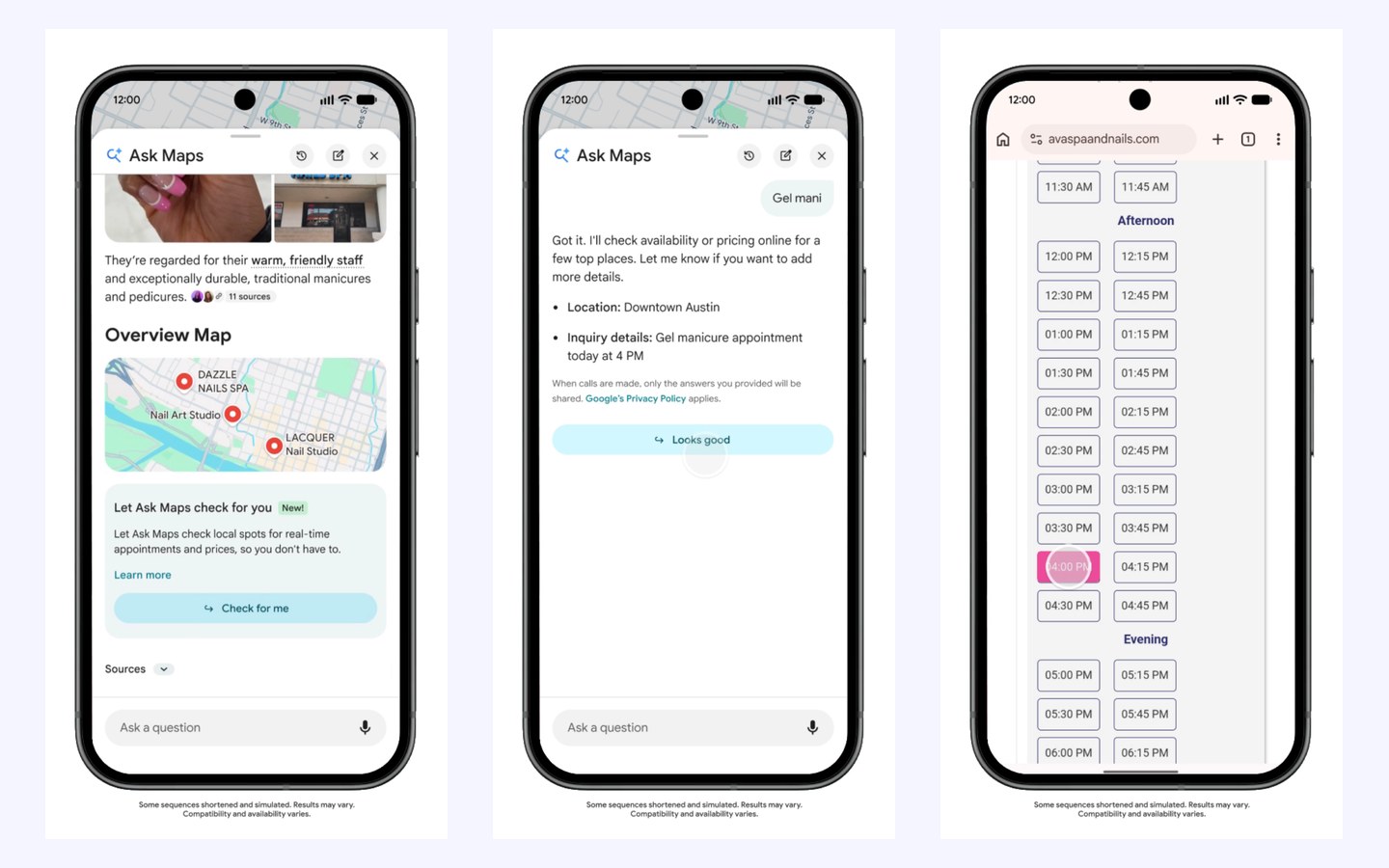
Google’s own words are that Ask Maps “will show you open slots across nearby businesses so it’s easy to decide what to book.” The post doesn’t say Ask Maps completes the booking. And in the demo, the AI works through the salon’s own booking page. If your times only exist in a paper book or behind a phone call, a call is the only way Ask Maps can learn them.
Which businesses will Ask Maps call?
For now, U.S. businesses in four categories: beauty, pet care, auto and home repair. That covers salons, nail and spa studios, groomers, auto shops and home repair companies.
Google says appointment finding is launching first in the U.S. and doesn’t give a date for other countries. Google’s help page on automated calls and texts from Google adds two limits for its existing booking calls: they’re “available in all states except Indiana, Louisiana, Minnesota, Montana, and Nebraska,” and Google may book “through the partner or by calling your business directly” if you use an online booking provider. That page covers requests from Google Search and Maps in general. It doesn’t mention Ask Maps by name, and Google hasn’t said whether the same rules apply to it.
What does a call from Google sound like?
An automated voice says it’s calling from Google and why. Google says these calls are recorded, and whoever answers can ask Google to stop calling.
Google’s page on calls from Google says “You’ll hear that the call is from Google and why they’re calling,” and gives this sample opening: “Hi! I’m calling from Google Maps to update your business hours. This is an automated service, so this call is recorded to help improve Google services.” A booking call would ask about a time and a service instead of your hours.
Tell whoever answers your phone about this now. A robotic voice at a busy front desk sounds like spam, and the natural reaction is to hang up. With appointment finding, that call is a customer looking for a slot today. Have your front desk answer it the way they’d answer a person: what’s open, what it costs, how long it takes.
Can you stop Google from calling your business?
Yes. In your Business Profile, open Business Profile settings, then Advanced settings, and switch off Google’s automated calls for bookings and inquiries. Your profile has to be verified first.
Google’s help page gives the path: select More, then Business Profile settings, then Advanced settings. Under “Google automated calls and text messages” there are three switches:
- Bookings and inquiries from customers
- Keep your profile up to date
- Post to your profile on your behalf
If your business isn’t verified, Google says “you must do so in order to opt out.” Our Business Profile verification guide walks through every method. You can also tell the caller “Please remove my business from your list.” Google notes that you may still get the occasional manual call to confirm your details.
Our advice for salons, groomers, auto shops and home repair companies is to leave bookings and inquiries switched on. Every one of those calls is someone trying to give you money this week. Switch it off only if the calls truly get in the way, and keep in mind Google hasn’t said how Ask Maps treats a business that opted out.
How do you make sure Ask Maps finds your open slots?
Put a working booking link on your Business Profile, keep your hours and holiday hours current, list your services and prices, and make sure someone answers the phone.
This is the same Business Profile work that gets you found on Google Maps in the first place. The difference is that an AI now reads it on the customer’s behalf.
- Add an online booking link. Google’s local business links page says that from Google Maps you select Edit profile, choose the transaction type (Booking), then Add link. You can add up to 10 links per category and mark your main one as “Business preferred.” If you use a scheduling provider that works with Reserve with Google, select Bookings, then Get started; Google says the provider shows on your profile within a week, and that “your provider might charge you.”
- Make the booking page work on a phone. In Google’s demo, Ask Maps picked a time on the salon’s own booking page. If your page is slow, broken on mobile or hides times behind a contact form, neither the AI nor your customer can see what’s open.
- Set your holiday hours. Google’s special hours page says to select Edit profile, then Hours, then Edit next to Special hours. Google also suggests you “confirm your hours for official holidays, even if they’re the same as your regular hours.”
- List your services and prices. In the demo, Ask Maps said it would “check availability or pricing.” Put your main services, with prices or price ranges, on your profile and your website so the answer is already there.
- Answer the phone in business hours. When Ask Maps can’t read your times online, it calls. An unanswered call is a missed customer.
- Keep reviews coming. The demo described each salon with phrases pulled from reviews (“warm, friendly staff”) before it ever checked a time. Our guide on how to get more Google reviews covers ways to ask that follow Google’s rules.
If your business doesn’t show up on Google Maps at all, start with why your business isn’t showing up on Google Maps. Ask Maps can only check businesses Google already knows about.
Is ChatGPT doing the same thing?
Not by phone. On November 10, 2026, OpenAI opened a free beta that lets businesses claim and update their own profile inside ChatGPT.
OpenAI’s own page blocks automated readers, so these details come from VentureBeat’s report on the launch of OpenAI’s Business Hub:
- Businesses can claim a profile and publish a Business Agent “for free at launch,” and OpenAI left open the possibility of charging later.
- OpenAI verifies a claim through a business phone number, email address, website domain or Shopify account, and the person managing it must pass an identity check through Persona.
- “Local stores and restaurants can currently claim only an existing U.S. listing.”
Between Google and OpenAI, AI assistants are starting to read your listing, check your website and contact you for the customer. When they pick which businesses to suggest, accurate hours, real prices and a booking page that works will count for a lot.
Not sure your profile and website are ready?
We’ll look at your Google Business Profile and your booking page and tell you what Ask Maps would find today, and what we’d fix.
Ask Maps FAQ
How do I use Ask Maps?
Open the Google Maps app, tap Ask Maps under the search bar, and type or say your question. You can ask follow-up questions in the same chat.
Why can’t I find Ask Maps?
Ask Maps is still rolling out country by country, and appointment finding is U.S. only for now. Update the Google Maps app first. On a computer, Google says Ask Maps needs WebGL turned on in your browser.
Can I turn off Ask Maps?
Google’s help page doesn’t describe a way to switch Ask Maps off in the app. It does explain how to delete your Ask Maps conversations from your chat history.
Does Ask Maps book the appointment for the customer?
Google says Ask Maps shows open slots across nearby businesses so the customer can decide what to book. Google hasn’t said that Ask Maps completes the booking itself.
Will Ask Maps call businesses outside the U.S.?
Not for appointments yet. Google says appointment finding is launching first in the U.S., with more regions coming soon, and hasn’t given dates.
If I turn off Google’s automated calls, will Ask Maps skip my business?
Google hasn’t said. Its help page on automated calls covers customer requests from Google Search and Maps but doesn’t name Ask Maps, and the Ask Maps announcement doesn’t mention an opt-out.