If you’re asking “why is my website not showing up on Google?”, the answer is usually one of three things: Google hasn’t found the site yet, something on the site is telling Google to stay away, or Google can reach the pages but doesn’t think they’re worth showing. All three can be checked for free in about 15 minutes. This guide covers the 10 reasons we see most often, how to check each one, and how to get your website to show up on Google once it’s fixed.
We build and launch websites for small businesses from our office in Raleigh, and getting a new site into Google is part of every launch we do. Where we quote Google, the link goes to Google’s own documentation, checked on November 5, 2026. If your problem is your business listing on Google Maps rather than your website, that’s a different system, and our guide to why your business isn’t showing on Google Maps covers it.
Why is my website not showing up on Google?
Usually the site is too new, is blocked by a noindex tag or robots.txt, has no links pointing to it, or is indexed but ranks too low to find.
Google’s own documentation is clear that showing up isn’t automatic: it “doesn’t guarantee that it will crawl, index, or serve your page, even if your page follows the Google Search Essentials” (Google Search Central). A page has to get through three stages: Google finds it (crawling), stores it (indexing), and then picks it for a search (ranking). Each of the reasons below breaks one of those stages.
- The site or page is new and Google hasn’t crawled it yet.
- A noindex tag is telling Google not to store the page. On WordPress this is often one checkbox.
- Your robots.txt file is blocking Google from crawling the page.
- A password, login or “coming soon” page is still switched on.
- Nothing links to the site, so Google has no path to it.
- The server is returning errors or the site is slow to respond when Google visits.
- Google picked a different version of the page, such as a staging copy or the www/non-www twin.
- Google crawled the page and chose not to index it, often because it’s thin or very similar to another page.
- A manual action or a hack has pulled the site out of results.
- The site is indexed but ranks low, so it shows for your business name but not for your services.
How do I check if my website is on Google?
Search Google for site:yourdomain.com. If pages appear, you’re indexed. For a single page, Search Console’s URL Inspection tool gives Google’s exact verdict.
Start with the quick check. Turn off SafeSearch, then type site: followed by your domain into Google, for example site:example.com, with no space after the colon. To check one page, put the full page address after site:. This is the first step in Google’s own troubleshooting guide, Why is my page missing from Google Search?
If nothing comes back, or the page you care about is missing, set up Google Search Console. It’s free, and it is the only place Google tells you directly what it thinks of your site. Add your site as a Domain property (it covers http, https, www and every subdomain at once) and verify it with a DNS record, as described in Google’s guide to adding a website property.
Then paste a page address into the URL Inspection bar at the top of Search Console. It tells you whether the page is indexed and, if it isn’t, why. The “Test live URL” button checks the page as it is right now, which is handy after you’ve fixed something. Google notes the page “must be accessible from the internet without any login requirements” for the test to work (URL Inspection tool help).
How long does it take for a new website to show up on Google?
Anywhere from a day or two to a few weeks, according to Google. Give it at least a week after submitting a sitemap before assuming something is wrong.
Google says the time from publishing to indexing “can be anywhere from a day or two to a few weeks, typically, depending on many factors,” and it asks site owners to “allow at least a week after submitting a sitemap or a submit to index request before assuming a problem” (Google Search Console Help). Its recrawl guide gives a similar range for re-crawling: “a few days to a few weeks” (Google Search Central).
Being indexed is also not the same as ranking. A brand new domain can be in Google within days and still sit on page five for “plumber near me” for months. Google’s SEO starter guide says some changes take effect in a few hours and others take several months, and suggests waiting a few weeks before judging whether a change worked (SEO Starter Guide).
Is your website telling Google to stay away?
Often, yes. A leftover noindex tag, the WordPress “discourage search engines” box, a robots.txt block or a password page will each keep a site out of Google.
This is the most common cause we find on new sites, because every one of these settings is useful while a site is being built. Nobody wants a half-finished site in Google, so it gets switched off. Then launch day comes and the switch gets forgotten.
The WordPress checkbox
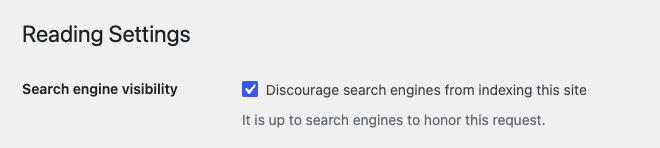
In WordPress, go to Settings, then Reading, and look at “Search engine visibility.” If “Discourage search engines from indexing this site” is ticked, WordPress adds a noindex, nofollow robots tag to every page (WordPress.org documentation). Untick it and save. SEO plugins such as Rank Math and Yoast can also set noindex on single pages or whole post types, so check the page’s SEO settings too.
A noindex tag anywhere else
Google’s documentation says a page with a noindex rule will be dropped “entirely from Google Search results, regardless of whether other sites link to it” (Google Search Central). To check a page, view its source and search for “noindex”, or run it through URL Inspection, which shows the exact HTML Google received.
Noindex doesn’t only come from settings screens. After one relaunch we worked on for a logistics client, six language versions of the home page were printing a noindex tag from a custom plugin. Three of them had brought in 45 search clicks in the 92 days before launch, and 4 in the 83 days after. Once the tag was removed and the pages were resubmitted, Google indexed the translated pages again within about three weeks. The site looked fine to every visitor the whole time, which is why this kind of problem lasts.
robots.txt
Open yourdomain.com/robots.txt in a browser. A line reading Disallow: / under User-agent: * blocks the whole site from being crawled. There’s a catch: Google says robots.txt “is not a mechanism for keeping a web page out of Google” (Google Search Central), and a page blocked by robots.txt can’t be read, so Google never sees its noindex tag either (noindex guide). If you’re trying to remove something from Google, use noindex and leave the page crawlable.
Passwords and “coming soon” pages
Google lists password protection alongside robots.txt and noindex as one of the most common reasons a page isn’t indexed (Google Search Console Help). Site builders and many hosts offer a site-wide password or a “coming soon” mode for unfinished sites. If yours is still on, Google sees the lock screen and nothing else. Open your site in a private browser window to see what a stranger, and Google, sees.
Can Google find and reach your pages?
Google finds pages by following links. A site nothing links to, pages missing from your menu, or a server that errors out can all leave pages undiscovered.
Google says plainly that it “discovers new sites from existing sites,” and asks you to make sure you “can reach any page on your site by following a chain of one or more links from your homepage” (Google Search Console Help). For a brand new business, the first links usually come from places you control: your Google Business Profile, your social media profiles, directory listings and any partner or supplier sites that will mention you. If your profile isn’t set up yet, our guide to Google Business Profile verification walks through it.
Inside your site, every page that matters should be linked from your menu, your footer or another page. A landing page that only exists in an ad campaign, with no link from anywhere on the site, is easy for Google to miss.
Server problems count too. If your hosting returns errors when Google visits, Search Console’s Page Indexing report lists those pages under “Server error (5xx)” (Page Indexing report help). A short outage won’t make a site vanish, but pages that keep erroring when Google visits can’t be indexed. That’s one of the reasons we watch uptime on the sites we host.
Do you need to submit a sitemap to Google?
Not always. Google says small, well-linked sites under about 500 pages may not need one, but a sitemap helps new sites and costs nothing to submit.
A sitemap is a file that lists the pages you want Google to crawl. Google’s guidance is that you might not need one if your site is “small,” which it defines as “about 500 pages or fewer,” and is well linked internally. It also says that if you use WordPress, Wix or Blogger, your platform has likely already made a sitemap available, and that “in most cases, your site will benefit from having a sitemap” (Google Search Central). Its recrawl guide adds that a sitemap “can be very helpful if you just launched your site” (Google Search Central).
To submit one, find your sitemap address first. On WordPress with Rank Math or Yoast it’s usually /sitemap_index.xml. WordPress’s built-in one is /wp-sitemap.xml. Then, in Search Console, open Sitemaps, paste the address and click Submit. You can also list it in robots.txt with a line like Sitemap: https://example.com/sitemap_index.xml, and a single sitemap file can hold up to 50,000 URLs (Build and submit a sitemap).
Submitting it once isn’t the end of the job, so check the Sitemaps report now and then. In October, Search Console flagged 40 errors on one of our own sitemaps. Our theme was writing a design setting into the image field, so the sitemap was listing addresses that weren’t real images. A small filter fixed it, but we’d never have known without looking at the report.
What does “crawled, currently not indexed” mean?
Google visited the page and decided not to store it for now. It’s common, and usually means the page looks thin, duplicated or less useful than similar pages.
Search Console’s Page Indexing report sorts every URL Google knows about into indexed and not indexed, with a reason for each. A few you’ll likely see:
- Crawled, currently not indexed. Google read the page and passed on it. Google calls this “a common message for many sites” that “doesn’t necessarily indicate an issue” (Page Indexing report help). If it’s an important page, make it more useful and more clearly different from your other pages, and link to it from somewhere prominent.
- Discovered, currently not indexed. Google knows the page exists but hasn’t crawled it yet. Google says it usually postponed the crawl to avoid overloading the site, which is why the last crawl date is empty. On one client site we audited, 7 of 14 service pages were stuck here. Stronger internal links help.
- Duplicate or alternate page. Google picked a different URL as the main version. That’s fine when it’s a real duplicate, but it’s a problem when the version Google picked is your staging site or an old copy.
- Excluded by noindex, or blocked by robots.txt. Fine on pages you meant to hide. If it’s your homepage, go back to the section above.
About staging copies: when a site is rebuilt, the old version or the test version is often kept online at another address. We have found more than one of those left open to Google, competing with the real site as a full duplicate. If you’ve had a redesign, search site: for any old or test addresses too, and make sure they are noindexed or password protected. Our checklist for website migration SEO covers the rest of what to check after a rebuild.
Could your website have a Google penalty?
It’s rare, but possible. Search Console’s Manual Actions and Security Issues reports show whether Google has taken action against your site or found it hacked.
A manual action is issued “when a human reviewer at Google has determined that pages on the site are not compliant with Google’s spam policies,” and when it happens, “some or all of that site will not be shown in Google search results” (Manual actions report help). Google also points out that if you bought or inherited a site or domain, it may have arrived with an old manual action already against it (Google Search Console Help).
Hacks are the more common version of this for small businesses. Spam pages injected into a WordPress site can get it flagged, or fill your search results with pages you never made. Do a site: search and scan for anything in another language or about products you don’t sell. If you find it, our guide to WordPress malware removal explains what the cleanup involves.
Why does my website show up for my name but not my services?
Because your site is indexed but not ranking. Google has it, but other pages answer service searches better, so yours sits too far down to notice.
If searching your business name brings up your site, the technical side is working. What’s left is competition. For a search like “roof repair Raleigh,” Google is choosing between dozens of businesses, directories and review sites, and it shows the pages it thinks answer that search best. You can’t buy your way up in the free results: Google “doesn’t accept payment to crawl a site more frequently, or rank it higher” (Google Search Central). Paid ads are a separate product.
For a small business, rankings mostly come down to the basics: a separate page for each service, written for the people who’d search for it; your town and service area named clearly; real reviews; a fast mobile site; and links from local sites that already have a good reputation. Our guide to small business web design covers what those pages should include.
Is this a website problem or a Google Maps problem?
They’re separate. Your website appears in the regular results, while the map listings come from your Google Business Profile, which has its own fixes.
Owners often mean the map when they say “I’m not on Google.” The map pack is driven by your Google Business Profile, its verification, category, reviews and distance from the person searching, not by whether your website is indexed. If that’s your problem, read why your business isn’t showing up on Google Maps and our Google Business Profile optimization guide. The two do help each other, so link your profile to your website and your website to your profile.
How do I get my website to show up on Google?
Remove anything blocking Google, verify the site in Search Console, submit your sitemap, request indexing for key pages, get a few real links, then give it a week.
This is the same order we follow when we launch a site. Turning on search visibility is the very last step of our launch checklist, because it’s the step that most often gets forgotten.
- Open the site in a private window. No password screen, no “coming soon” page, no errors.
- Turn search visibility on. On WordPress, untick “Discourage search engines” under Settings, then Reading, and check your SEO plugin isn’t setting noindex on key pages.
- Check robots.txt. Make sure it doesn’t say
Disallow: /for all user agents. - Verify your site in Google Search Console as a Domain property.
- Submit your sitemap in the Sitemaps report.
- Request indexing for your most important pages using URL Inspection: your homepage and main service pages. Google limits these requests, and asking twice won’t speed it up (Google Search Central), so use them on the pages that matter.
- Get your first links. Add the website to your Google Business Profile, your social profiles and the directories in your industry.
- Wait a week, then check again with a
site:search and the Page Indexing report.
Frequently asked questions
How much does it cost to be listed on Google?
Nothing. Showing up in Google’s regular results is free, and Google says it doesn’t accept payment to crawl a site more often or rank it higher. Only ads cost money.
Can robots.txt remove a page from Google?
No. Google says robots.txt is not a way to keep a page out of Google. Use a noindex tag or a password instead, and leave the page crawlable so Google can see the noindex.
Why did my website disappear from Google after a redesign?
Usually a noindex setting carried over from the test site, page addresses changed without redirects, or important content was removed. Check URL Inspection on your old top pages first.
Does Google index every page of my website?
No. Google says indexing isn’t guaranteed and that most sites have some pages that aren’t indexed. What matters is that your homepage and your main service pages are.
How often should I request indexing in Search Console?
Once per page, after a real change. Google limits these requests and says asking again for the same page won’t get it crawled any faster. Use a sitemap for many pages at once.
The short version
When a website isn’t showing up on Google, start with the boring checks: a site: search, the WordPress search visibility box, robots.txt and any password page. Then set up Search Console, submit your sitemap and request indexing for your main pages. If the site shows up for your name but not your services, the technical side is done and the work is now content, reviews and links.
If you’ve been through this list and still can’t work out why your site is missing, talk to us and send the address. We’ll tell you what we find. If you’re planning a new site, tell us what you need, and getting it into Google is part of the launch.