You’re reading this on our new website! We rebuilt snazzy.solutions from the ground up, with clearer service pages and plan prices you can see before you ever talk to us.
The bigger news for our clients launches with it. Snazzy Sites, the platform our team uses every day to look after more than 140 websites, now has a place for you. You get one dashboard for your website, plus a free Chrome extension that logs you into WordPress with one click.
What is Snazzy Sites?
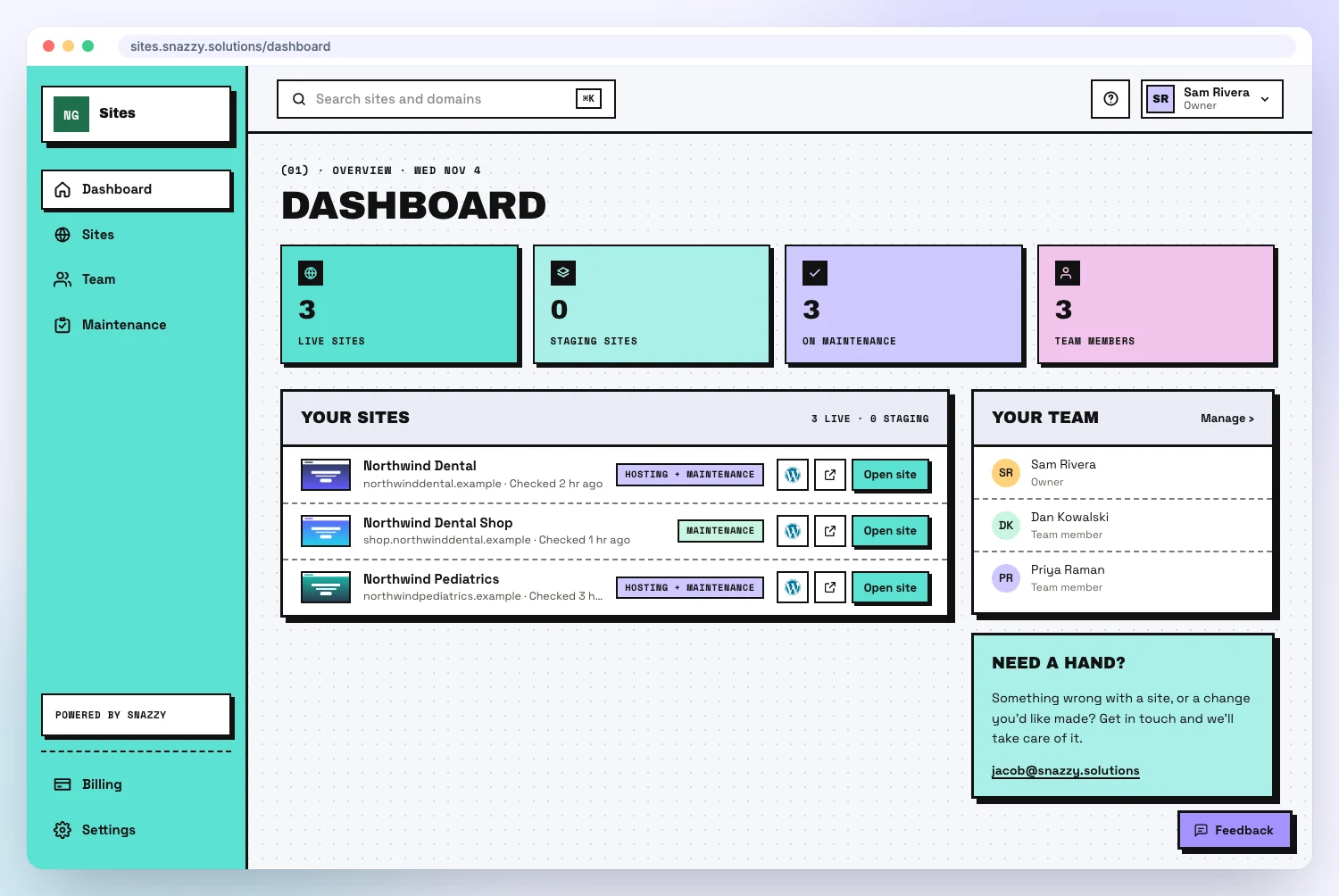
Snazzy Sites is a dashboard that shows every website we look after for you, what we handle on each one, and who can log in.
Ask most business owners where their website login is and you’ll get a long pause. It’s in an old email, or a former employee set it up, or the person who built the site has moved on. Whether anyone is looking after the site at all can be even harder to answer.
This is the same platform our team and agency partners have been running on since September. Now you get your own view of it. You sign in with a link sent to your email, so that’s one less password to remember.
What can you do in the dashboard?
You can see what your plan covers, check when your site last reported in, log in to WordPress, and decide who else gets access.
See exactly what you’re paying for
Every site has its own page listing what your plan covers: hosting, backups and when the last one ran, the security certificate, updates, error monitoring, spam protection on your forms, and the monthly checkup by a real person. You’ll also see how recently the site checked in with us.
Get into WordPress without the password hunt
Press Open WordPress and you’re in, usually within a few seconds. A menu next to the button takes you straight to your pages, plugins, media or users.
Control who can get in
Add your office manager or your marketing freelancer by email, then choose which sites they can open and what WordPress role they get. Everyone has their own account, so nobody is passing around one admin password. When someone leaves, remove them and their one-click login goes with them.
Every login is recorded under the person’s name, and each site’s page shows when everyone last signed in.
What does the Snazzy Login Chrome extension do?
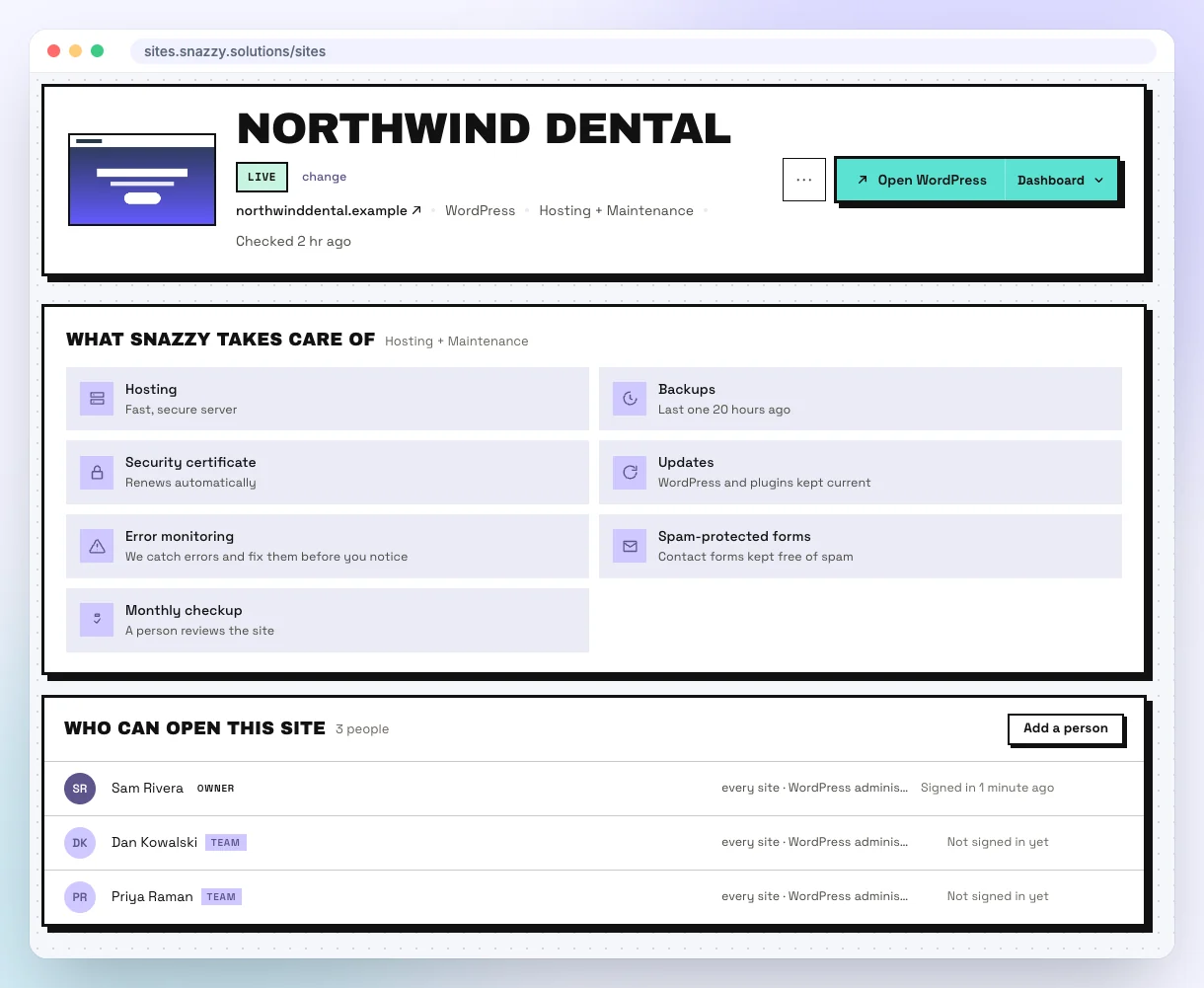
Snazzy Login adds a Log in to WordPress button to your own website in Chrome, so one click gets you in without a password.
If you try one thing from this post, make it this one. We built it for our own team first, because logging in to websites all day gets old fast. It’s so much better than the old way that we wanted every client to have it.
Once it’s installed, a small WordPress button sits in the corner of your site. Point at it, click Log in to WordPress, and a few seconds later you’re logged in and still on the page you were looking at. Spot a typo on your About page and you can go straight from noticing it to fixing it.
Logging in the old way
- Try to remember your login page’s address
- Guess which email you used
- Try three passwords
- Click Lost your password and wait for the email
- Forget what you came to change
Logging in with Snazzy Login
- Go to your website
- Click Log in to WordPress
- Make your change
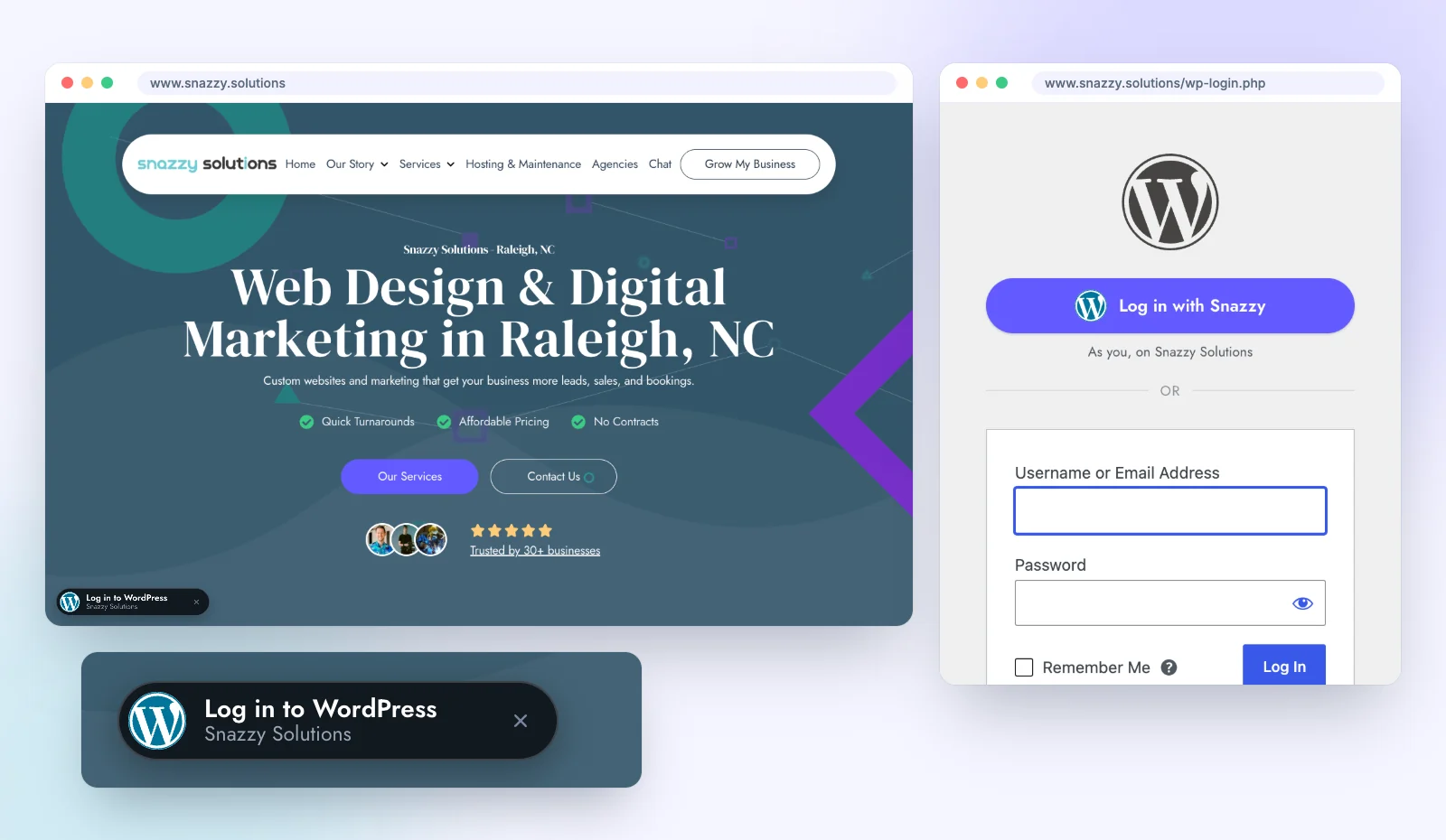
On the WordPress login page, a Log in with Snazzy button sits above the usual form, and the normal form still works if you ever want it. The corner button moves out of the way of cookie banners and disappears once you’re logged in. Don’t want it on a site? You can hide it there.
Each login uses a one-time link that expires after 60 seconds, so there’s no password to write down or share. The extension only works with sites in your Snazzy Sites account, and it never reads your forms or anything you type. Our Snazzy Login privacy page has the details.
Report a problem from the page it’s on
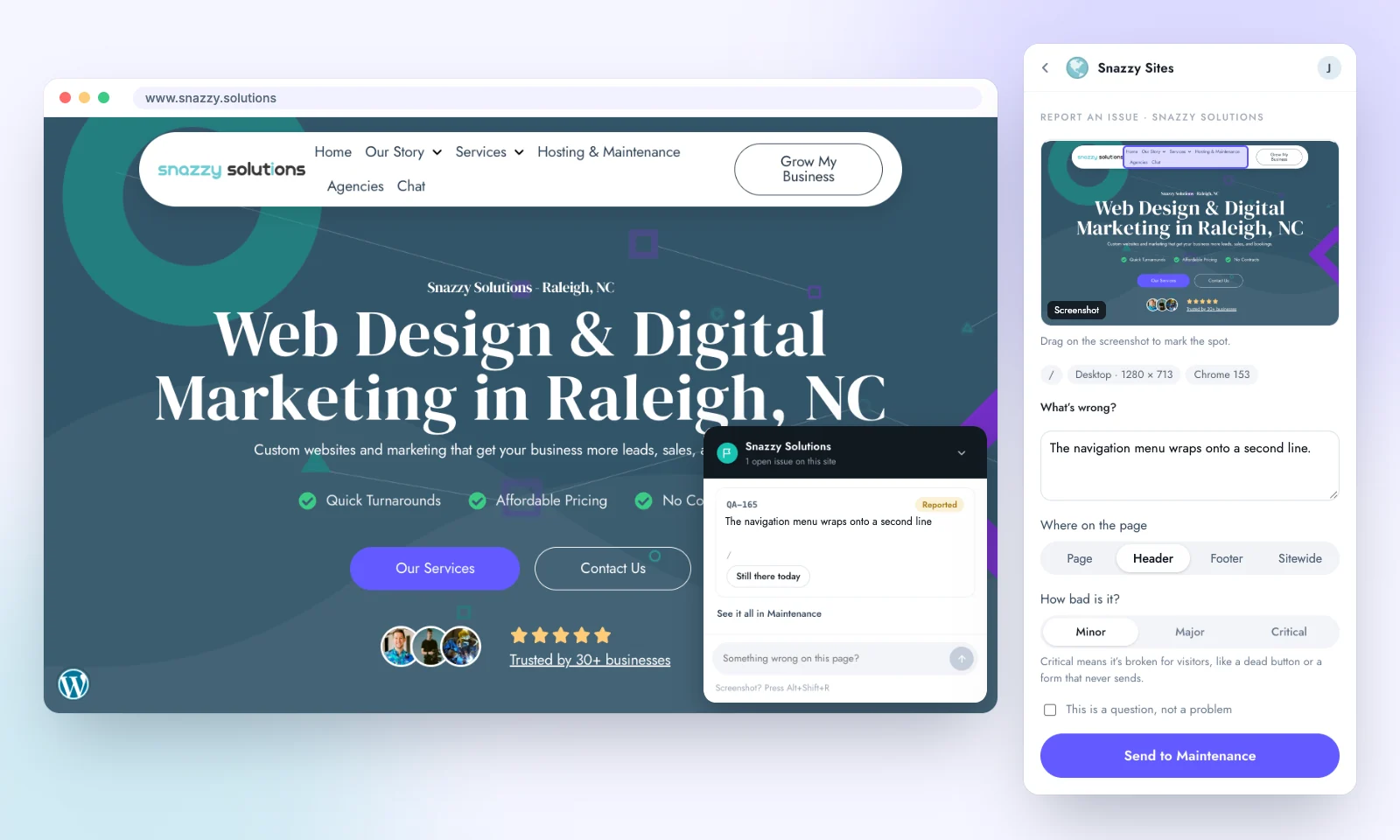
Something looks wrong on your site? Press Alt+Shift+R or use the extension’s toolbar button, and it takes the screenshot for you. Drag to mark the spot, write a sentence, say how bad it is, and it goes straight to our team. A small issue button on the page shows you what’s already been reported.
How do you get the dashboard and extension?
The dashboard and Chrome extension come with our $100 a month Snazzy maintenance plan, which works on any host and has no long-term contract.
The tools are the part you see. The plan pays for the people behind them. Every month, someone on our team reviews your site. We run your WordPress, plugin and theme updates, fix whatever an update breaks, keep daily backups, and watch for downtime.
Most of what we catch never shows an error message. On one hosting platform, the update tools reported success while changing nothing, and a check across 38 sites found 18 quietly out of date. When another site moved to a new server, its saved email password broke and form messages stopped arriving. The owner of a site like that has no reason to look, which is why we do. There are more examples on our website maintenance page, and our guide to WordPress maintenance plans covers what a good plan should include.
The Snazzy plan
$100 a month. Month to month, on any host.
- A monthly checkup by a real person
- WordPress, plugin and theme updates
- Fixes when an update breaks something
- Daily backups
- Uptime monitoring
- Same-day support in business hours
- A monthly website report
- Your Snazzy Sites dashboard
- The Snazzy Login Chrome extension
How do current clients get set up?
If you’re already on a maintenance plan, we’ll email you an invite to your dashboard, and adding the Chrome extension takes about a minute.
Once you’re signed in, go to Settings, then Chrome extension. Press Add to Chrome, come back, and press Connect this browser. Not a client yet? Tell us about your site or call us at (919) 444-2005.
What’s coming next to the dashboard?
Monthly reports, your checkups and what’s been fixed, plus your plan and invoices, are all on the way to the dashboard.
You’ll see them marked Coming later on your site’s page. Until they arrive, your monthly report and invoices keep coming the way they do today.
Frequently asked questions
Do I have to use the dashboard?
No. We do the same work every month whether you ever sign in or not. The dashboard is there for when you want to check on your site, get into WordPress, or give someone access.
Is the Chrome extension free?
Yes. Snazzy Login is free and works in Google Chrome. You need a Snazzy Sites account to connect it, because it only works with the sites in your account.
Does this work if my site isn’t hosted with you?
Yes. The Snazzy maintenance plan does not require our hosting. We maintain WordPress sites on WP Engine and other hosts for the same $100 a month.
What if my site is on Shopify, Squarespace or Wix?
One-click login is for WordPress. Shopify, Squarespace and Wix sites can still sit on your dashboard list, with a link to their own login page.
Does the maintenance plan cover hack cleanup?
No. Hack and malware cleanup is not included in any plan and is billed at $50 an hour. Your daily backups and updates are there to keep your site in good shape, but cleanup is separate work.
Is there a contract?
No. Every plan is month to month, and you can move up or down whenever your needs change.